

• Duphat
  • infinia camp
mededge mea logo web MedEdge_Logo_Dark

Public Relations, Top Health Magazine and Healthcare News GCC

  • Newsletters
  • Magazines
  • Subscribe
  • Home
  • News
  • Opinion
  • Interviews
  • Featured
  • Cover Stories
  • Events
  • Health For all
    • Ageing Gracefully
    • Family Health Matters
    • Environment Health
    • Women and Child Health
    • Men’s Health
  • Resource Hub
    • Fresh Perspectives
    • Medical Tourism
    • Medical Education
    • Personnel
    • Research
      • Healthcare Journals & Publishers
    • Healthcare Campaigns
    • Health Tools Hub
    • Dubai Health Centers Directory | Services, Locations & Timings
    • ME Explained
Reading: Samsung and Google introduce Galaxy watch for kids: How to use it?
Share
Notification
  • Duphat
  • infinia camp
mededge mea logo web
  • Magazines
  • Newsletters
  • Profiles
  • Subscribe
Search
  • Home
  • News
  • Opinion
  • Interviews
  • Featured
  • Cover Stories
  • Events
  • Health For all
    • Ageing Gracefully
    • Family Health Matters
    • Environment Health
    • Women and Child Health
    • Men’s Health
  • Resource Hub
    • Fresh Perspectives
    • Medical Tourism
    • Medical Education
    • Personnel
    • Research
    • Healthcare Campaigns
    • Health Tools Hub
    • Dubai Health Centers Directory | Services, Locations & Timings
    • ME Explained
Have an existing account? Sign In
MedEdge MEA > Innovation & Tech > Samsung and Google introduce Galaxy watch for kids: How to use it?
Innovation & Tech

Samsung and Google introduce Galaxy watch for kids: How to use it?

ME Desk
ME Desk
Published: January 24, 2025
Share
3 Min Read
Galaxy Watch
SHARE

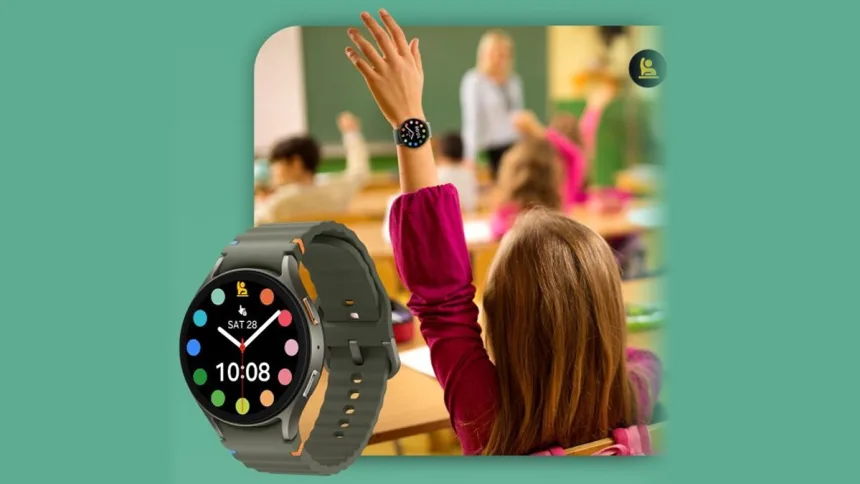
Samsung, in collaboration with Google, launched the all-new Galaxy Watch for Kids experience on Galaxy Watch7 LTE, powered by Wear OS. Parents can manage the watch through Google Family Link, which allows them to set the necessary safeguards and personalize their childโ€™s watch experience โ€” giving parents peace of mind.

Contents
  • Setup from Parentsโ€™ Phone
  • Stay Connected to Your Child When Theyโ€™re On the Go
  • Self-Expression and Learning Experiences Designed for Kids

This all-new Galaxy Watch experience equips parents with a wide range of tools to help families stay connected.

Setup from Parentsโ€™ Phone

Setting up Galaxy Watch for Kids is an intuitive process. To get started, youโ€™ll pair the Galaxy Watch7 LTE to your phone, select โ€˜set-up for a childโ€™, follow the directions to set up features, and then activate the eSIM. After setup, a smartphone is no longer required for your child โ€” allowing children to develop healthy digital habits, while learning to use smart devices responsibly.

Stay Connected to Your Child When Theyโ€™re On the Go

Parents can set up a range of helpful features that ensure their child is connected. With location sharing, parents can help give their child a sense of independence while keeping an eye on where they are while wearing the watch. Parents can also manage their childโ€™s contacts by specifying who their child can call and text, and who can call and text their child. And if someone needs help, the child can immediately send an SOS message by pressing the side button five times. During school hours, parents can even activate school time, a Do Not Disturb-like mode that limits distractions on their childโ€™s watch to help them concentrate on learning.

Also Read : Whatโ€™s New in Samsungโ€™s Galaxy Ring Update for 2025?

Self-Expression and Learning Experiences Designed for Kids

Creativity and self-expression are so important to children as they establish their identity. Thatโ€™s why our new Galaxy Watch experience is designed to help kids feel empowered and build confidence. Your child can show off their style with a variety of watch faces and kids bandsโ€” allowing children to mix and match with their favourite look. Kids can also enjoy a fun wearable experience on their wrist with 20+ new Teacher Approved apps and watch faces on Google Play, featuring characters and activities from Barbieโ„ข, Crayola, Marvel, MathTango, PBS Kids, Rebel Girls, Tinkercast, and Unicorn Academyโ„ข. These experiences are designed to spark learning and discovery across kid-friendly topics and themes, including math, science, creativity, music, physical activity, mental health, well-being, and more.


Share This Article
Facebook Whatsapp Whatsapp LinkedIn Copy Link
Share
Previous Article free Georgia Achieves Malaria-Free Certification
Next Article Mayo Connect with Mayo Clinic’s Global Health Leaders at Arab Health 2025

Recent Posts

  • From market access to national ambition, gulf healthcare is playing a longer game
  • New Push for HIV Innovation and Access Aims to Accelerate Progress Toward 2030 Goals
  • WHO Discusses Digital Health and Humanization of Care at Scientific Conference
  • Rising Ebola Cases Deepen Humanitarian Crisis for Children in DR Congo
  • Burjeel holdings secures dual credit ratings and launches USD 1.5 billion sukuk programme
  • duphat
  • MedEdge-Infinia
Two Point Five Logo white
  • About Us
  • Contact Us
  • Medical Disclaimer
  • Privacy Policy
  • Terms and Conditions
  • Cookie Policy (EU)
  • Submit Your Story
  • MediaKit
Reading: Samsung and Google introduce Galaxy watch for kids: How to use it?
Share

Published by Two Point Five Media FZCO

  • About Us
  • Contact Us
  • Medical Disclaimer
  • Privacy Policy
  • Terms and Conditions
  • Cookie Policy (EU)
  • Submit Your Story
  • MediaKit
Reading: Samsung and Google introduce Galaxy watch for kids: How to use it?
Share

Follow US on Social Media

Facebook Instagram Linkedin X-twitter Youtube Whatsapp
Manage Consent
To provide the best experiences, we use technologies like cookies to store and/or access device information. Consenting to these technologies will allow us to process data such as browsing behavior or unique IDs on this site. Not consenting or withdrawing consent, may adversely affect certain features and functions.
Functional Always active
The technical storage or access is strictly necessary for the legitimate purpose of enabling the use of a specific service explicitly requested by the subscriber or user, or for the sole purpose of carrying out the transmission of a communication over an electronic communications network.
Preferences
The technical storage or access is necessary for the legitimate purpose of storing preferences that are not requested by the subscriber or user.
Statistics
The technical storage or access that is used exclusively for statistical purposes. The technical storage or access that is used exclusively for anonymous statistical purposes. Without a subpoena, voluntary compliance on the part of your Internet Service Provider, or additional records from a third party, information stored or retrieved for this purpose alone cannot usually be used to identify you.
Marketing
The technical storage or access is required to create user profiles to send advertising, or to track the user on a website or across several websites for similar marketing purposes.
  • Manage options
  • Manage services
  • Manage {vendor_count} vendors
  • Read more about these purposes
View preferences
  • {title}
  • {title}
  • {title}

WhatsApp us

Logo of Medede mea
Welcome Back!

Sign in to your account

Username or Email Address
Password

Lost your password?